Home Security
Assistant
A custom Home Assistant integration that provides real-time network security monitoring for your home.
It combines passive NetFlow/IPFIX traffic analysis with active network scanning, external IP threat intelligence,
DNS blacklist checks, and vulnerability detection — all presented through a dedicated multi-view sidebar dashboard.
Get it on GitHub
Explore Features
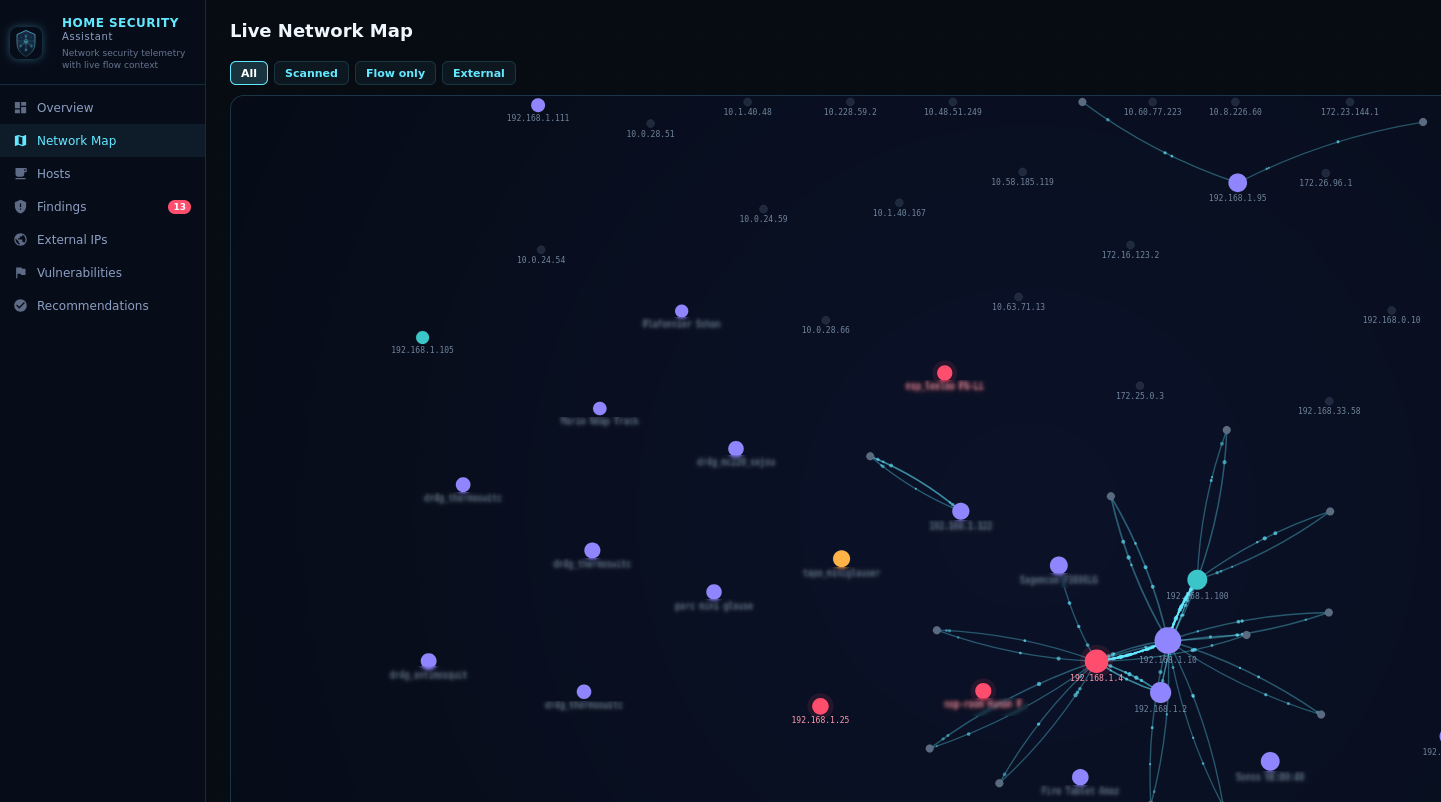
Network Flow Analysis
Passively monitor all your network traffic without installing agents on any device.
Home Security Assistant listens for NetFlow v5, v9, and IPFIX datagrams on a configurable UDP port and classifies
internal vs. external traffic using your configured CIDR ranges.
- Tracks per-device flow counts, byte volumes, and connection history
- Detects suspicious patterns: outbound traffic to commonly abused ports, port scanning, unusual egress volume
- Works with any standard NetFlow/IPFIX exporter — no proprietary hardware needed
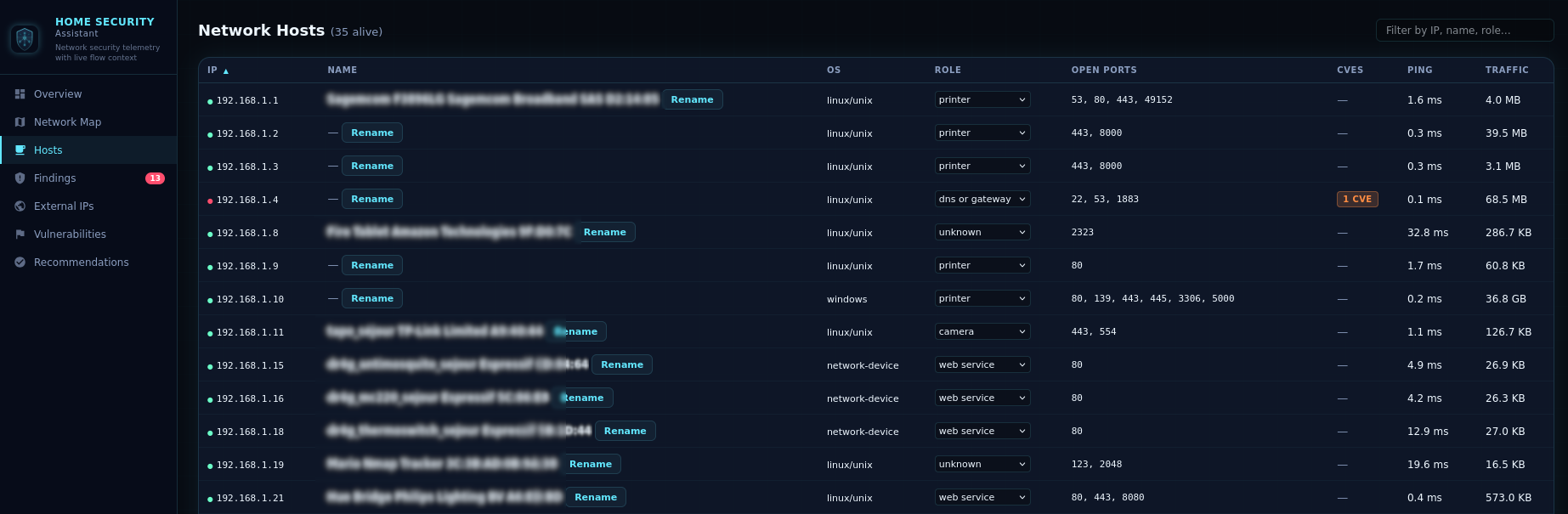
Active Network Scanner
Go beyond passive monitoring with optional ping + port scanning of all observed internal hosts.
The scanner runs on a configurable interval and discovers services even when hosts block ping.
- Configurable scan ports — specify individual ports, ranges, or both (e.g.
22,80,443,8000-9000). Defaults to 47 well-known ports
- HTTP fingerprinting — lightweight WhatWeb-style technology detection identifies CMS platforms
(WordPress, Joomla, Drupal), web servers (Tomcat, IIS, Caddy), applications (Grafana, GitLab, Nextcloud, Pi-hole, Synology DSM, UniFi),
and runtimes (PHP, Node.js, ASP.NET)
- Reports alive status, ping latency, open ports, OS fingerprint, and detected technologies per host
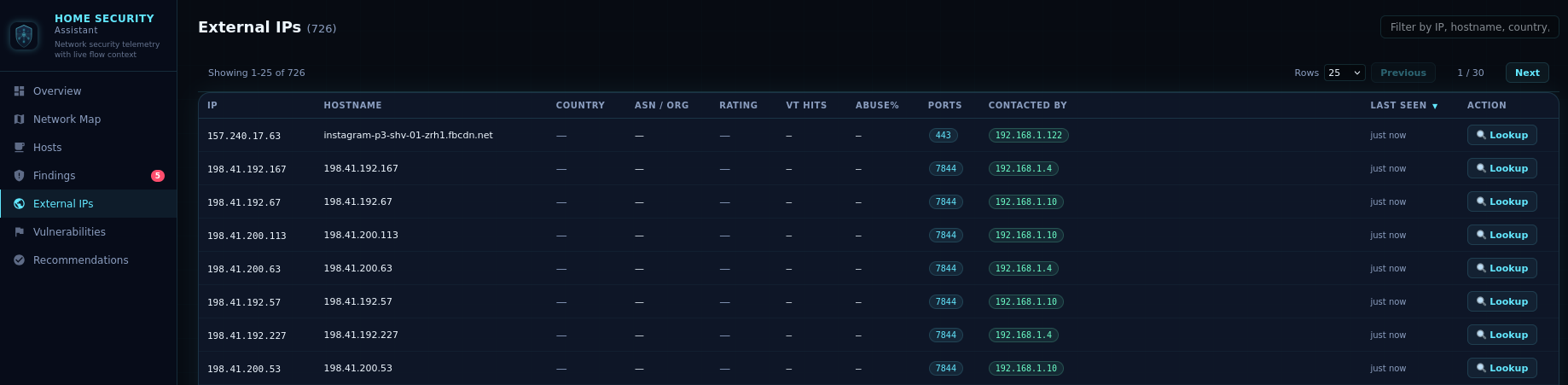
External IP Intelligence
Every external IP that communicates with your network is automatically enriched with threat intelligence
from multiple sources, giving you unparalleled visibility into who is connecting to your home.
- Enrichment from ipwho.is, VirusTotal, and AbuseIPDB (all optional, API keys configurable)
- Background-only enrichment — provider calls run in a background queue, while on-demand lookups return cached results instantly
- Reverse DNS resolution for external IPs
- Checks external IPs and hostnames against threat intel blacklists (abuse.ch feeds by default, fully customizable)
- Severity-based retention — clean IPs: 24 h, suspicious: 48 h, malicious: 168 h (7 days)
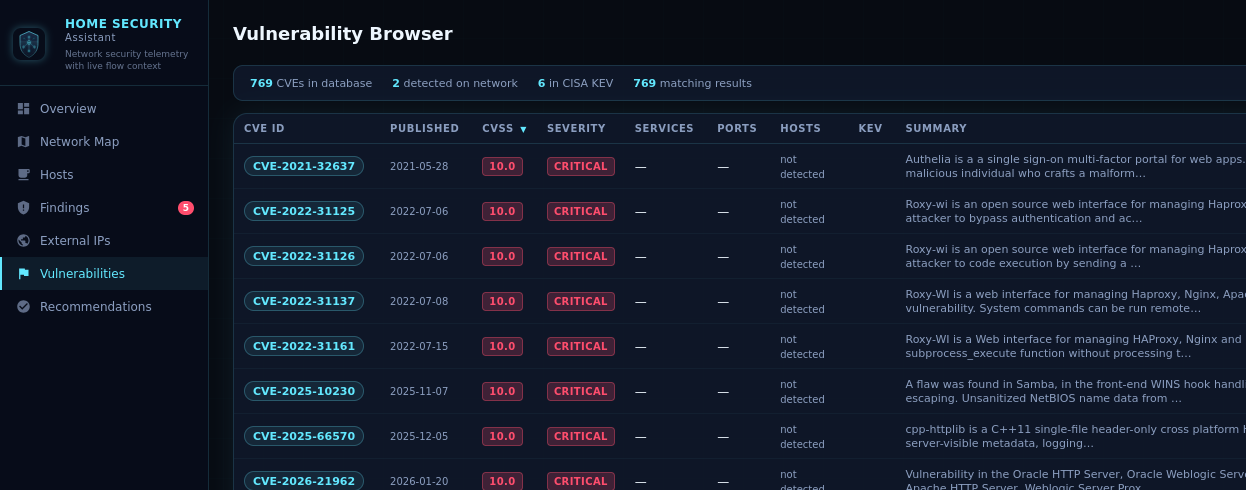
Vulnerability Detection
Proactively discover known vulnerabilities on your network before attackers do.
Home Security Assistant queries the NIST National Vulnerability Database (NVD) and cross-references findings
against the CISA Known Exploited Vulnerabilities catalog.
- NVD enrichment — precise CPE vendor/product filtering for 20+ service mappings: SSH (OpenSSH, Dropbear), HTTP (Apache, nginx),
MySQL/MariaDB, FTP, SMTP, Redis, MongoDB, PostgreSQL, Samba, MQTT, and more
- Service-aware prefetching — only queries NVD for services actually detected on your network
- HTTP technology validation — CVEs for web applications are only reported if the technology was confirmed via HTTP fingerprinting,
eliminating false positives
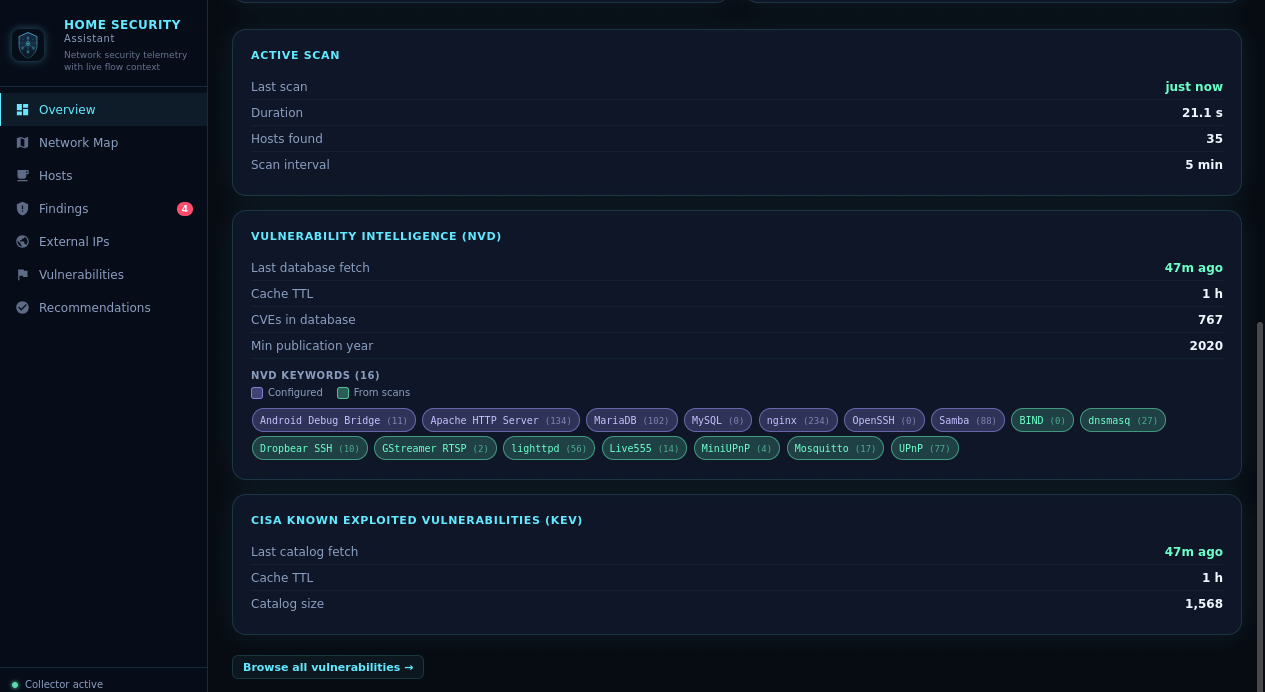
- CISA KEV flags — highlights CVEs under active exploitation in the wild
- Version-range matching — checks if your exact detected version falls within a vulnerable range
Device Fingerprinting & Enrichment
Every device on your network is automatically fingerprinted and categorized, giving you a complete inventory
of your connected home.
- Infers device roles: gateway, camera, IoT, unknown, etc.
- Editable roles — correct any auto-detected role via dropdown; overrides persist across restarts
- Enriches device identities from Home Assistant
device_tracker entities (IP, name, hostname, MAC)
- Flags devices with known high/critical CVE vulnerabilities as "at risk"
Security Findings
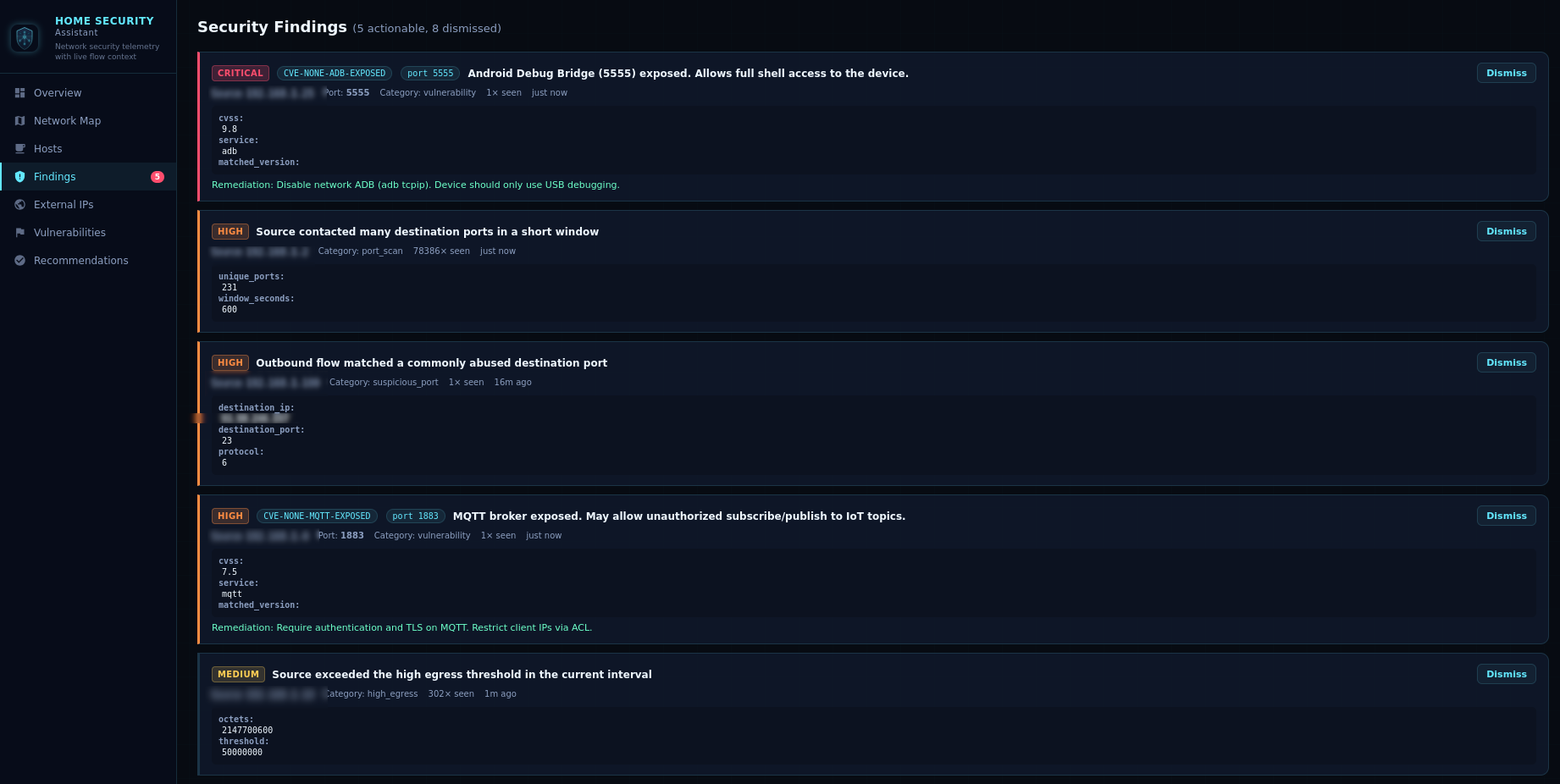
No more wading through raw logs. Get clear, prioritized findings with severity ratings,
source IPs, categories, and occurrence counts.
- Categories: suspicious ports, port scanning, high egress, vulnerabilities
- Dismissible findings — clear resolved issues from the UI
- Hardening recommendations derived from observed behavior and telemetry gaps
DNS Proxy
Built-in DNS proxy protection lets Home Security Assistant inspect DNS traffic and block malicious domains in real time.
- Intercepts DNS queries on a configurable local port and forwards allowed requests to your upstream resolver
- Checks queried domains against loaded threat-intel feeds and blocks known malicious lookups
- Per-category blocking — optionally restrict categories such as
malware, phishing, and ads
- DNS overrides — define static
domain=ip rules for local split-DNS and fixed host mappings
- Maintains a rolling DNS query log and fires a
homesec_malicious_dns Home Assistant event for blocked queries

Sidebar Dashboard
A dedicated multi-view single-page application registered directly in the Home Assistant sidebar.
Auto-refreshes every 30 seconds with live updates.
| View |
Description |
| Overview |
Summary stats, Active Scan card, NetFlow listener health, recent alerts, DNS Proxy status, and NVD keyword chips color-coded by source |
| Network Map |
Live force-directed graph with zoom/pan showing scanned hosts, flow-active hosts, at-risk devices, gateways, and top external peers |
| Hosts |
Searchable device inventory with inferred roles, scan results, and tracker-enriched names |
| Findings |
Actionable security findings with dismiss buttons, CVE details, and remediation hints |
| External IPs |
Enriched external IP table with threat ratings, VirusTotal hits, AbuseIPDB scores, and on-demand lookup |
| Vulnerabilities |
Sortable CVE browser with CVSS scores, severity, CISA KEV flags, network match indicators, and a detail modal with full description and CPE criteria |
| Statistics |
Top external IP talkers and countries plus enrichment budget usage, provider plan detection, and API error visibility |
| DNS Queries |
Paginated DNS log with domain/client filtering, verdict/category filters, malicious-only mode, and blocked-by-category chart |
| Recommendations |
Prioritized hardening suggestions based on your current network state |
Sensors & Services
Sensors
| Sensor |
Description |
| Active Devices |
Count of observed internal devices |
| Scanned Devices |
Count of devices with active scan results |
| Total Flows |
Total NetFlow/IPFIX records ingested |
| Open Findings |
Count of actionable (high/critical) findings |
| Vulnerability Count |
Count of CVE vulnerabilities detected |
| Suspicious Sources |
Devices reaching commonly abused ports |
| High Egress Sources |
Devices exceeding outbound data threshold |
| NVD Keywords |
Count of NVD search keywords in cache with per-keyword CVE count and source classification |
Services
| Service |
Description |
homesec.trigger_scan |
Immediately run a full active network scan without waiting for the next scheduled interval |
homesec.nvd_refresh |
Flush the local NVD CVE cache and re-fetch fresh vulnerability data from NVD |
homesec.blacklist_refresh |
Clear loaded threat-intel entries and immediately re-download configured blocklist URLs |
Quick Installation
Getting started with Home Security Assistant takes just a few minutes.
Installation via HACS (Recommended)
- In Home Assistant, open HACS → Integrations → Custom Repositories.
- Add
https://github.com/domo-monster/HomeSecurityAssistant as a custom integration repository.
- Search for Home Security Assistant in HACS and click Install.
- Restart Home Assistant.
- Go to Settings → Devices & Services → Add Integration and search for "Home Security Assistant".
- Configure the bind host, UDP port, internal network CIDRs, scanner settings, and optional API keys.
- Point your router or flow exporter at the Home Assistant host and configured port.
Manual Installation
- Copy the
custom_components/homesec directory into your Home Assistant custom_components/ folder.
- Restart Home Assistant and add the integration from Settings → Devices & Services.
- Configure the bind host, UDP port, internal network CIDRs, scanner settings, and optional API keys.
- Point your router or flow exporter at the Home Assistant host and configured port.
Device tracker enrichment is automatic — if you have router or presence integrations that create
device_tracker entities, Home Security Assistant will use those names, hostnames, and MAC addresses.
Recommended Exporters
- OpenWrt with
softflowd
- OPNsense / pfSense NetFlow or IPFIX export
- UniFi gateway flow export
- MikroTik Traffic Flow
Configuration Options
All options can be changed after setup via Configure on the integration card. Changes trigger an automatic reload.
Core Settings
| Option |
Default |
Description |
| Bind host |
0.0.0.0 |
UDP listen address |
| Bind port |
2055 |
UDP listen port |
| Internal networks |
192.168.0.0/16, 10.0.0.0/8, 172.16.0.0/12, fd00::/8, fe80::/10 |
Comma-separated CIDRs |
| Enable sidebar panel |
true |
Register the Web UI panel |
Active Scanner
| Option |
Default |
Description |
| Enable active scanner |
true |
Ping + port scan internal hosts |
| Scan interval |
3000 s |
Seconds between active scans |
| Scan exceptions |
empty |
Comma-separated IPs to skip during scanning |
| Scan ports |
47 default ports |
Comma-separated ports or ranges to probe |
Threat Intelligence & Enrichment
| Option |
Default |
Description |
| External IP retention (clean) |
5 h |
How long to keep clean external IPs (0 = forever) |
| Suspicious IP retention |
48 h |
How long to keep external IPs rated as suspicious |
| Malicious IP retention |
168 h |
How long to keep external IPs rated as malicious |
| Enable reverse DNS |
true |
Resolve external IP hostnames |
| Blacklist URLs |
abuse.ch feeds |
Comma-separated threat intel feed URLs |
| VirusTotal API key |
empty |
Optional, enables VT lookups |
| AbuseIPDB API key |
empty |
Optional, enables abuse score lookups |
| Enrichment cache TTL |
1440 min |
Minutes before re-querying providers |
| AbuseIPDB confidence before VirusTotal query |
30 |
Only query VirusTotal when AbuseIPDB confidence meets/exceeds this threshold |
| VirusTotal daily budget |
500 |
Maximum VirusTotal requests per day |
| AbuseIPDB daily budget |
1000 |
Maximum AbuseIPDB requests per day |
Vulnerability Database (NVD)
| Option |
Default |
Description |
| NVD cache TTL |
12 h |
Hours before re-fetching CVE data |
| NVD minimum CVE year |
2020 |
Oldest CVE year to include (0 = all years) |
| NVD search keywords |
16 defaults |
Product names to query NVD for (e.g. OpenSSH, nginx, WordPress) |
DNS Proxy
| Option |
Default |
Description |
| Enable DNS proxy |
false |
Run a local DNS proxy that filters queries against threat-intel blacklists |
| DNS proxy port |
53 |
UDP port the DNS proxy listens on |
| DNS proxy upstream |
1.1.1.1 |
Upstream resolver for non-blocked queries |
| DNS proxy check sources |
empty |
Limit blocking to matches from specific feed sources (empty = all) |
| DNS blocked categories |
empty |
Comma-separated feed categories to block (e.g. malware, phishing, ads) |
| DNS overrides |
empty |
Static domain=ip rules (one per line or comma-separated) |
| DNS log retention |
24 h |
Hours to keep DNS query log entries (0 = keep all) |
Secure your smart home today
Home Security Assistant is free, open-source, and built for the Home Assistant community.
Start monitoring your network in minutes.
View on GitHub
Contact Us